SolaX X1 Inverter Monitoring Dashboard
Purpose-built monitoring for SolaX X1-Mini, X1-Boost, and X1-Hybrid single-phase inverters. Real-time data, analytics, and forecasting.
Monitoring Your SolaX X1
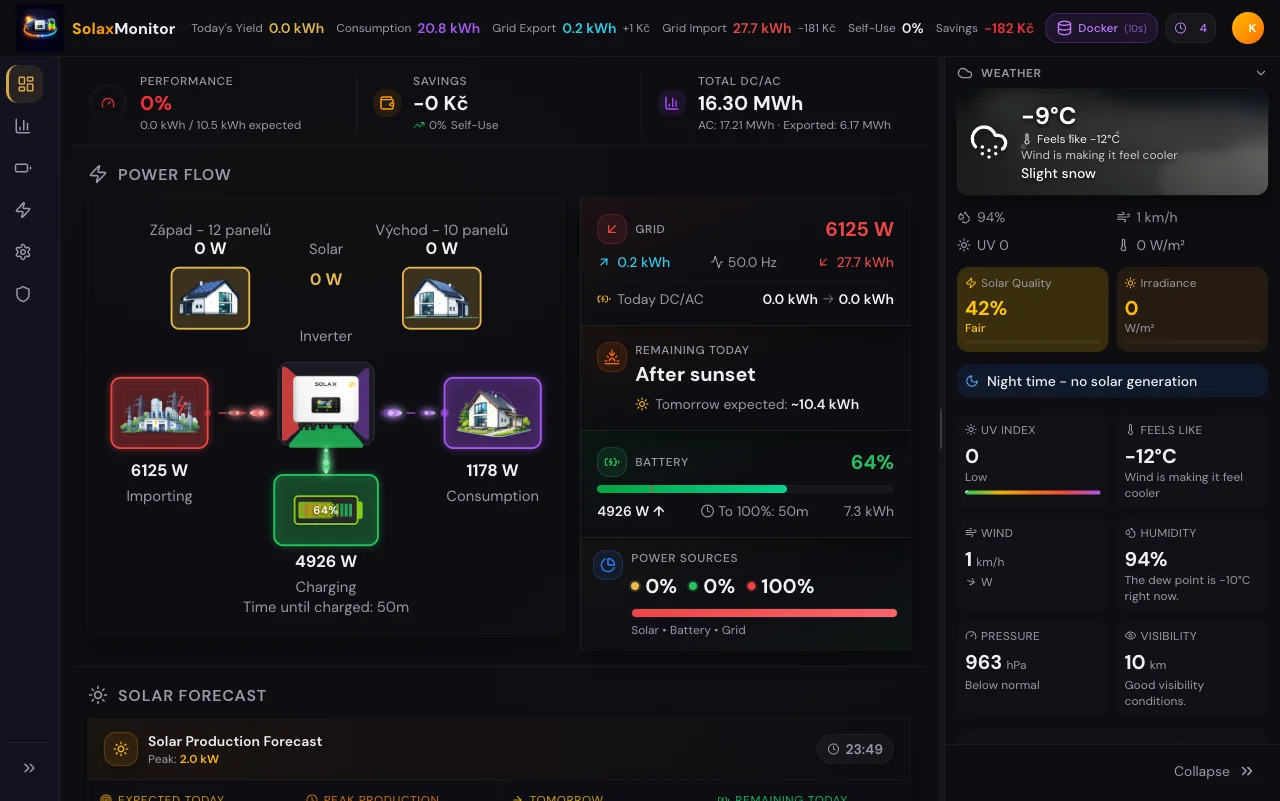
The SolaX X1 series is one of the most popular single-phase inverter ranges in Europe. Whether you have an X1-Mini (0.7–3.3 kW), X1-Boost (3–6 kW), or X1-Hybrid (3–7.5 kW), Solax Monitor gives you a dedicated dashboard that's purpose-built for your inverter's data.
The Collector reads local inverter data about every 10 seconds. The app uses it for current readings, history, tariffs, supported wallboxes and automations.
Compatibility checked against SolaX documentation
Check the exact model before installing
SolaX uses different firmware, communication modules and register maps across generations. This table is a practical starting point, not a blanket promise for every inverter carrying the same family name.
| Model | SolaX reference | Local connection |
|---|---|---|
| X1-MINI G3 | ARM V1.46 | Supported WiFi/LAN path; dongle firmware matters |
| X1-MINI G4 / G4 Plus | ARM V1.0 | Supported WiFi/LAN path; dongle firmware matters |
| X1-SMART G2 | ARM V2.05 | Supported WiFi/LAN path; dongle firmware matters |
| X1-BOOST G3 | ARM V1.46 | Supported WiFi/LAN path; dongle firmware matters |
| X1-BOOST G4 | ARM V1.0 | Supported WiFi/LAN path; dongle firmware matters |
| X1-Hybrid G4 | ARM V1.23 | Model-specific Modbus/COM path; verify first |
The firmware shown is the version named by SolaX. Newer firmware can work, but the local data path and register map still need checking.
Official SolaX compatibility note · 15 July 2026
What we verify before enabling control
- Stable read-only telemetry on the exact hardware.
- Fields that match the correct register map.
- Writable registers and safe restore behaviour before Modbus writes are enabled.
X1 Series Compatible
Works with X1-Mini, X1-Boost, X1-Air, and X1-Hybrid models. Full data support for all variants.
Single-Phase Metrics
AC output, DC input, grid frequency, voltage, and power factor — all in real-time.
Cloud & WiFi Direct
Connect through SolaXCloud, or use the SolaxMonitor Collector for 10-second local data and control on your home network.
Solar Forecasting
Weather-based production predictions calibrated to your X1's installed capacity.
Key Metrics for X1 Owners
Your SolaX X1 reports a rich set of data points. Solax Monitor displays them all:
- Current solar production (W) and daily yield (kWh)
- AC output voltage, frequency, and power factor
- DC input from each MPPT string (PV1, PV2 where applicable)
- Grid import/export power and energy totals
X1-Hybrid: Battery Support
If you have the X1-Hybrid variant, Solax Monitor's dedicated battery page shows SOC percentage, charge/discharge power, battery temperature, and daily battery usage patterns. Set low-battery alerts to get notified when SOC drops below your preferred threshold.
The analytics page breaks down how much solar energy goes to self-consumption vs battery charging vs grid export, helping you optimize your energy independence.
Frequently Asked Questions
Which X1 models does Solax Monitor support?
No. Solax Monitor is an independent third-party monitoring application built by a SolaX owner. It is not affiliated with SolaX Power Co., Ltd. You can connect it through SolaXCloud or with the SolaxMonitor Collector.
Does the X1-Mini support Collector monitoring?
If your X1-Mini setup exposes local inverter data through a compatible WiFi/LAN dongle, the Collector can read it locally and send the data securely to SolaxMonitor.
Can I see both MPPT strings on my X1-Boost?
Yes. X1-Boost can report dual MPPT data, and SolaxMonitor shows PV1 and PV2 power and voltage separately. That makes shading or string differences much easier to spot.
Is battery monitoring available for the X1-Hybrid?
Yes. The X1-Hybrid reports full battery data including SOC, charge/discharge power, and temperature. Solax Monitor has a dedicated battery page with real-time data, trend charts, and configurable low-battery alerts.
Explore More Features
Ready to Monitor Your SolaX System?
Connect through SolaXCloud, run the Collector on a device you already own, or order the prepared Collector Box, which is in stock.
Start Free Trial